Track scoring
Siren can record which players score during a game. This is optional (rotations and fairness tracking work perfectly without it) but turning it on unlocks richer stats.
AFL games record goals (6 points) and behinds (1); netball games record goals only (1 point each); rugby league games record tries (4 points) and conversions (2 points), plus penalty goals (2) and field goals (1) from Under 13, where the international laws apply; rugby union games record tries (5 points) and conversions (2), plus penalty goals (3) and drop goals (3) from Under 10; football (soccer) games record goals for each side; basketball games record free throws (1), baskets (2) and threes (3, from Under 12) for each side; touch football and Oztag games record tries (1 point) for each side, and on a mixed Oztag team a girl's try counts 2. The switch behaves the same way in every sport — turn it on for your team, and the live screen shows the right scoring controls for your sport. It starts off for the youngest age groups (AFL Under 8 to Under 10, netball Set, league Under 6 and Under 7, which are tag games with no scoreboard, union Under 6 to Under 11, where the national pathway keeps no score, and football's MiniRoos ages, Under 6 to Under 11, which keep no scores or ladders, basketball's Under 8 skills games, and touch and Oztag to Under 9) and on for the rest.
Futsal games record goals for each side, as football does. Scoring starts off to Under 9, as Capital Football's Minis keep no scores, and on from Under 10.
Hockey games record goals for each side too. Scoring starts off to Under 10, where junior hockey keeps no results, and on from Under 11.
Turning it on
- Open your team and tap the Team tab.
- Under Game-day extras, turn the scoring switch on. It reads Track goals & behinds (AFL), Track goals (netball and football), Track points (league, union and basketball) or Track tries (touch and Oztag).
- The setting is saved immediately and applies to all of the team's games. Team admins can change it at any time.
What it changes during the live game
With scoring enabled:
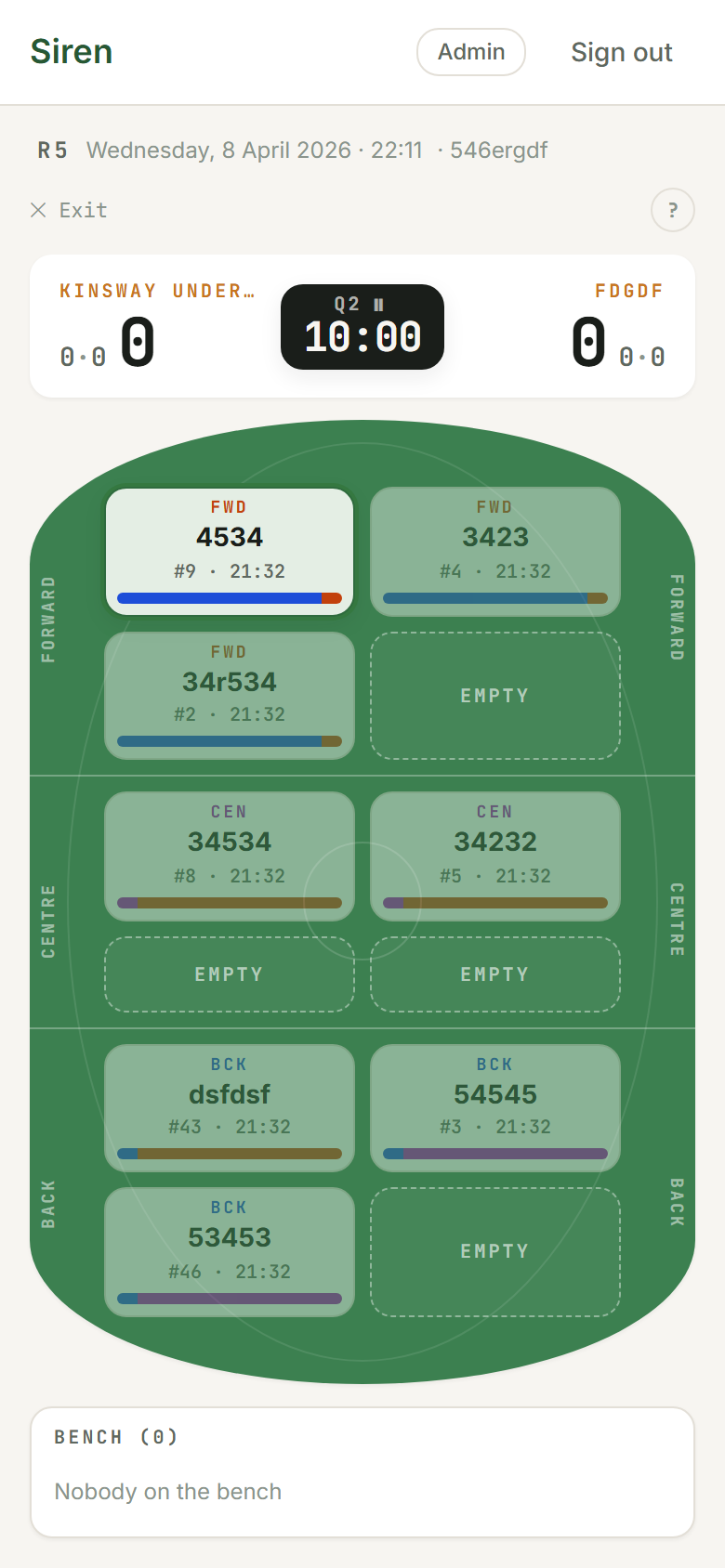
- Tapping a player on the playing area selects them and reveals the scoring action(s). AFL: + Goal and + Behind, for any player on the field. Netball: + Goal, and only the GS and GA shooter positions are tappable for attribution. League: + Try for any player on the field. From Under 8 to Under 12, a try opens the kicker picker for the conversion so the §15 goal-kick rotation is honoured. From Under 13 there's no rotation, and + Penalty goal and + Field goal sit beside + Try. Union: + Try for any player on the field; from Under 8 a try opens the kicker picker for the conversion (union has no kicking rotation), and from Under 10 + Penalty goal and + Drop goal sit beside it.
- Each player's tile shows a small chip with their tally for the game (in league and union, their tries).
- Score buttons appear beside each team's score in the scoreboard: AFL +G and +B; netball +G; league +T and +C, plus +PG and +FG from Under 13; union +T and +C, plus +PG and +DG from Under 10. Under 6 and Under 7 don't kick in either code, so there's no +C.
- The scoreboard updates in real time. AFL displays the standard goals·behinds with total points; netball shows a single goals tally; rugby league and union show the points total with a “tries · conversions” breakdown alongside (and penalty and field or drop goals once there are some).
- An Undo strip sits just above the scoreboard so you can take back the latest score. In AFL and netball it flashes the score you just recorded for 8 seconds.
What it unlocks in Stats
Games with scoring tracked contribute data to the following Stats views:
- Player stats: goals and behinds for AFL; goals for netball; tries, conversions made and attempted, and from Under 13 penalty and field goals, for league; the same with penalty and drop goals from Under 10 for union
- Position fit (AFL): player effectiveness in each line
- Quarter-by-quarter scoring (AFL): your scoring pattern across the game
- Head-to-head by opponent (AFL and netball): your record against each team
- Team totals (league and union): tries, points, conversions and points conceded for the season
- Scorers: AFL goal kickers and netball goal shooters are listed on the game detail page after the game; league and union try scorers are in the full-time summary
If you leave it off
All rotation and fairness features work exactly the same. Season balance, attendance and playing time are still recorded. The stats that depend on scores won't populate for games where scoring wasn't tracked.