Rotations
The rotation engine watches how much time every player has spent in each position, both in the current game and across the whole season, and suggests swaps that balance things out. You never have to do the maths yourself.
How rotations are applied depends on your sport. AFL and league teams rotate during play: the app suggests swaps each time the sub timer runs out. Netball teams rotate at quarter breaks: the app suggests a fresh lineup at every break, and teams that turn on mid-quarter subs can also sub during a quarter. The aim is the same in every sport — only the moment of action differs.
How the algorithm works
Whenever the app needs to suggest a lineup, it ranks the possible placements by how much they would improve overall fairness, considering:
- Season time: time in each line or position across this season's finished games (AFL lines, netball positions, league Forwards and Backs)
- Current-game minutes: time accrued so far in this game
- Recent subs: AFL won't pull off a player who only just came on, or bring straight back a player who only just went off, within the same sub interval. League pairs each bench player with whoever has been on the field longest, so a player who just came on isn't the one taken off.
- Kept players: AFL players kept on the field never leave, and players kept in a line stay in it; netball players kept in a position stay there at the next break; league never suggests taking off the FR or DH vest wearer, or a player who plays every minute
- How we play: your rotation style, season balance, each player's role (where they play, their main spot, plays every minute) and your rules (keep apart, keep together, nobody sits out twice in a row…). See the Squads help page for roles.
The result is a small set of swap pairs during AFL and league rolling subs (league suggests one swap for each bench player), or a complete next-quarter lineup at a netball break.
The swap card (AFL and league)
With rolling subs, suggested swaps appear in the dark swap card above the playing area. It has two states:
- Collapsed: shows a countdown ring (or an icon when the timer isn't running), the number of suggested swaps, and a one-line summary (e.g. Alex→Sam · Jordan→Blake). Tap to expand.
- Expanded: shows each pair in a row with its line label colour-coded, a Make swap button per pair, and a Make all N swaps button at the bottom.
After you commit a swap (via Make swap or Make all), the card collapses automatically and the sub timer resets.
The countdown ring and NOW badge
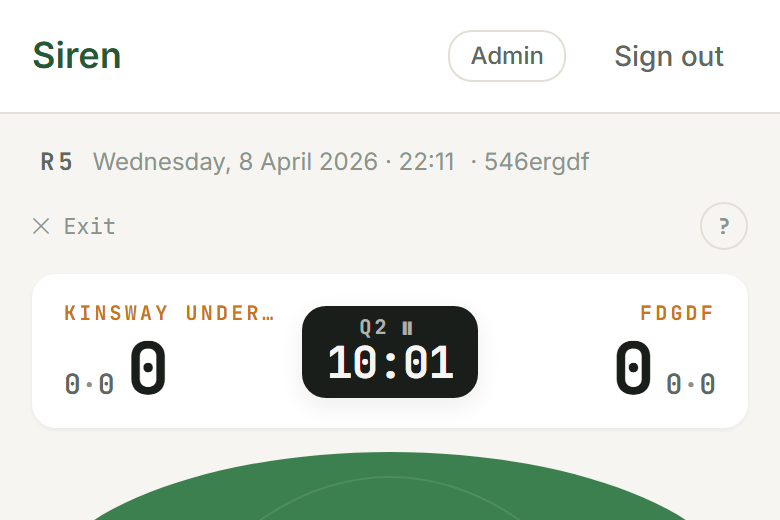
On rolling subs (AFL and league), the swap card header includes a circular progress ring that fills as the sub interval counts down. When it reaches zero:
- The ring turns orange and the counter displays NOW.
- The card reads Sub due.
- The card expands automatically to show the suggestions.
Quarter-break rotation (netball)
For netball, the rotation engine runs at the break instead. When a quarter ends, the app shows a Lineup for Q{n} screen with the suggested next lineup already in place. The reshuffle is weighted by who's played least, who hasn't had a turn at their preferred position, and the rules of play (which positions each player can enter). Tap two players to swap them, or accept the suggestion and start the quarter.
Netball teams that prefer to sub mid-quarter can turn on Allow mid-quarter subs (Team › How we play). Then long-press a player on court and tap Switch player to bring someone on.
Rotations in rugby union
Junior rugby union uses rolling subs, the same model as league and AFL, with none of league's junior laws: no vests, no kicking rotations and no unbroken-period rule. The game-time floor in How we play (half the game by default) keeps playing time fair, and you can change it like any other sport. Kids play forwards or backs to Under 9; from Under 10 you can give them named positions, numbered as on the jersey (LK4, HB9, N8 and so on).
Rotations in football (soccer)
Junior football uses rolling subs: kids come on and off at any time, as MiniRoos allows. When the sub interval runs out, the swap card suggests a bench rotation that evens out everyone's minutes, and over the season Siren moves kids through defence, midfield and attack so nobody is always stuck at the back. Under 6 and Under 7 play 4 a side with no keeper and no lines: Siren just evens out minutes.
The keeper
From Under 8 one kid keeps goal for the whole half. Rolling subs never take the keeper off; to change keeper mid-half, long-press the keeper and tap Replace keeper. At half-time Siren plans the next half, starting with who takes the keeper top. Choose how in How we play:
- Everyone has a turn in goal (the default to Under 11): the fewest keeper minutes this season go in next, and last half's keeper plays out in the field.
- Keepers (the default from Under 12): you name your keepers and they share goal.
On the Squad tab, set a kid's home to Keeper to mark a keen keeper (or one of your named keepers), or mark Keeper as somewhere they'd rather not play.
Rotations in futsal
Futsal runs on football's engine: 5 a side with a keeper at every age, and flying subs, on and off through the sub zone at any time. When the sub interval runs out, the swap card suggests a bench rotation that evens out everyone's minutes, and over the season Siren moves kids through the back, the wings and the front. Those are futsal's positions in plain words: the back is the fixo, the wings are the alas, and the front is the pivô. The usual shape is 2-2 (two back, two up front); the diamond (1-2-1) and 3-1 are in the lineup's Game settings.
The keeper
One kid keeps goal for the half. Futsal's laws let a sub swap with the keeper at any time, so to change keeper mid-half, long-press the keeper and tap Replace keeper. At half-time Siren plans the next half, starting with who goes in goal. Everyone has a turn in goal is the default to Under 11, and Keepers (you name them) from Under 12.
Team fouls and the 2-minute send-off are the referee's to count: Siren doesn't track them yet.
Rotations in hockey
Hockey runs on football's engine too: rolling subs at any time, as often as you like, and over the season Siren moves kids through the defenders, the midfield and the strikers. The rules allow no sub during a penalty corner, which Siren can't see, so wait for the corner to finish. Under 7 and Under 8 play 6 a side with no keeper and no lines: Siren just evens out minutes.
The keeper changes at the break
Keeper kit takes a few minutes to put on, so in hockey goal changes hands only at a break, and there's no Replace keeper during play. Two minutes before the break Siren names who's in goal next (“Mia's in goal next half: start kitting up”), and the break's plan starts with them. If the keeper is hurt, long-press them and mark the injury, then pick who goes in. Everyone has a turn in goal is the default from Under 9 to Under 12, and Keepers (you name them) from Under 13.
Halves or quarters
Siren plays halves to Under 12 and 4 × 15 quarters from Under 13. If your competition plays the other (Victoria plays 2 × 30 halves), switch it under Team › Season › Halves or quarters; new games follow it.
Rotations in basketball
Five play from a squad of eight to ten, so up to half the team sits at any moment. Subs go at a dead ball, through the table: when the sub interval runs out, the swap card names who goes to the table, and you tap them on when the whistle goes. Siren lines up the kids with the least time this game, and there's no sub prompt in the last minute of a half or quarter.
Positions are optional
Choose how kids rotate in How we play:
- Equal minutes (Under 8 and Under 10): no positions; Siren just evens out minutes. Set a kid's home to Guards on the Squad tab to mark a ball handler, and Siren keeps one on court.
- Guards and forwards (Under 12 and Under 14): every kid plays both, evened out over the season.
- Home line (Under 16 and up): each kid is a guard or a forward, with time on the other line too; subs go guard for guard.
- All five positions: 1 to 5, the most different positions per kid.
- Set positions: a home position plus backups; the bench rotates like-for-like.
Fouls, foul-outs and sit-outs
With Track fouls on (from Under 12, or in Settings), tap a kid on court and tap + Foul. Each tile shows its count; Siren takes a kid one foul short of fouling out off first, and the fifth foul takes them out for the game. You pick who comes on. For a technical or unsportsmanlike foul, long-press the kid and tap Sit out 5 min: they can't come back on until five minutes of playing time have run (timeouts don't count).
Rotations in touch football and Oztag
Subs roll on and off as often as you like: through the interchange in touch, from the sub box in Oztag. When the sub interval runs out the swap card names who comes on for whom, and the banner says make the change next time you have the ball. Touch allows no interchange after an intercept or line break until the next touch (TFA rule 17.7), and Oztag's junior championships allow changes only in attack, so subbing while you defend gets the timing wrong.
Lanes are optional
The lanes run up the field: middles in the centre, links either side of them, wings on the edges (2, 2 and 2 at six a side; 1, 2 and 2 at five). Choose how kids rotate in How we play:
- Minutes only (touch Under 6 to Under 9, and Oztag at every age, since Oztag names no positions): no lanes; Siren just evens out minutes.
- Rotate positions (touch from Under 10, when TFA's junior framework brings positions in): every kid takes turns at middle, link and wing, evened out over the season.
- Home position: each kid has a home lane, with time in the others too. Set it with Role on the Squad tab.
Mixed teams: the boys' cap
A mixed team keeps a cap on boys on the field: touch's rule is at most 3 boys and at least 1 boy and 1 girl (TFA rule 5.4); Oztag's is at most 4 boys and at least 1 girl. Turn on Mixed team when you make the team or on the Team tab, where you can also set your competition's own numbers. Then mark each kid Girl or Boy on the Squad tab (Siren asks at the lineup for anyone you missed, and when you add a fill-in). It's used only for the rule and shows nowhere else.
- Every suggested lineup and sub keeps the rule. At the cap a boy only comes on for a boy.
- Boys and girls are evened separately: with 6 on, at most 3 boys, and a squad of 8 boys and 4 girls, the boys share 3 places (about 37 % each) and the girls 3 (75 % each). The time floor in the game report compares each kid within their group.
- Short of girls, the field shrinks to what the rule allows: with one girl, touch says You can field 4: 3 boys and 1 girl, and again if a girl is hurt or leaves.
- A swap you make by hand that breaks the rule gets a warning, not a block: your competition may play a local rule.
Oztag's girl's try
In a mixed Oztag game a girl's try counts 2 (ITF rule 4.3). Credit the try to the scorer and Siren counts it; the opponent's buttons are +1 and +2 (girl). If your competition doesn't play it, turn off A girl's try counts 2 on the Team tab.
Rules the referee keeps
In touch, the half (the dummy half) can't score a try. Junior Oztag plays modified rules: no marker, and the dummy half can run but can't score. Siren doesn't track these.
Rotations in rugby league
Junior rugby league (Under 6 to Under 12) adds rotation rules from the National Junior League Laws on top of rolling subs. Siren tracks each one so the coach can't accidentally break a law. From Under 13 the international laws apply: there are no vests, no kicking rotations and no unbroken-period rule.
Player rotation
Rolling subs, same model as AFL. Tap a player on the field, then a bench player, to swap them. When the sub interval runs out, the swap card suggests a full bench rotation. Players wearing the FR or DH vest are never suggested to come off.
Vested-role rotation (FR / DH)
Junior Laws §12: the First Receiver wears a yellow vest from Under 8; the Dummy Half wears a pink vest from Under 9. Both rotate each period and no player wears the same vest twice in a game. Pick the first wearers on the lineup screen; at each break a vest card asks who wears them next and greys out players who've already had a turn. If a vest wearer leaves the field, Siren asks who takes the vest. A Replace option covers the laws' injury carve-out (the vest can pass to a replacement for the rest of that period only).
Goal-kick rotation
Junior Laws §15 (Under 8 to Under 12): once a player has kicked at goal, they can't kick again until everyone on the field at the time has had a turn. After a try, the conversion dialog disables players who've already kicked this cycle and resets the rotation once everyone's had a turn. A boot badge sits on each on-field tile so you can see who's already kicked at a glance, even before opening the dialog. The Force toggle covers the fouled-in-act-of-scoring carve-out. Under 6 and Under 7 don't kick at all.
Kickoff rotation
Junior Laws §16 (Under 8 to Under 12): once a player has kicked off, they can't kick off again until every other player on the field has had a turn. A Kickoff card appears at the start of each period, listing the players on the field; anyone who's already had a turn shows as Done. A small "K" chip on the player tile marks anyone who's kicked off this game. Tap Skip if you're not tracking it.
Unbroken-period coverage
Junior Laws §6: every player must play at least two unbroken quarters (U6–U9) or one unbroken half (U10–U12). "Unbroken" means on the field continuously from period kickoff to hooter — no swaps off. It's off by default: turn on Enforce unbroken periods under Team › How we play, or for one game in Game settings. When it's on, the suggested starting lineup puts first any player who missed out in earlier games. The Stats tab shows how many games each player met the rule and lists any shortfalls, so you can plan next week's rotations accordingly.
Player tiles and badges
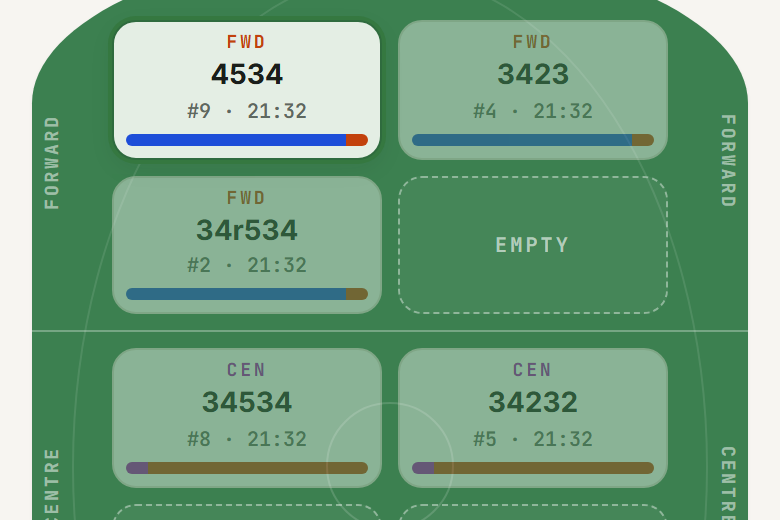
Each player tile shows:
- Jersey number (AFL and league — netball squads don't use them)
- Name and their minutes on
- Position label at the top (e.g. FWD / CEN / BCK for AFL, GS / GA / WA / C / WD / GD / GK for netball). League tiles show a named position when your team uses Named positions, and an FR or DH badge on the vest wearers.
- A time bar at the bottom: a thin horizontal bar colour-coded by area showing how much time this player has spent where. In league it only shows when Track forward and back time is on.
When a player is part of a pending swap suggestion (AFL and league rolling subs):
- A ↓ badge marks the player coming off
- A ↑ badge marks the player coming on from the bench
- Both tiles show a pair number so you can match them up
Position colour coding
Colours are consistent across every position indicator in the app. Each sport has three: one for the attacking end (AFL Forward, netball Attack, league Forwards), one for the middle (AFL and netball Centre; in league, time wearing the FR or DH vest), and one for the defending end (AFL Back, netball Defence, league Backs). Within a sport the same colour means the same area everywhere — the live tile, the time bar, the stats cards.
Keeping a player on
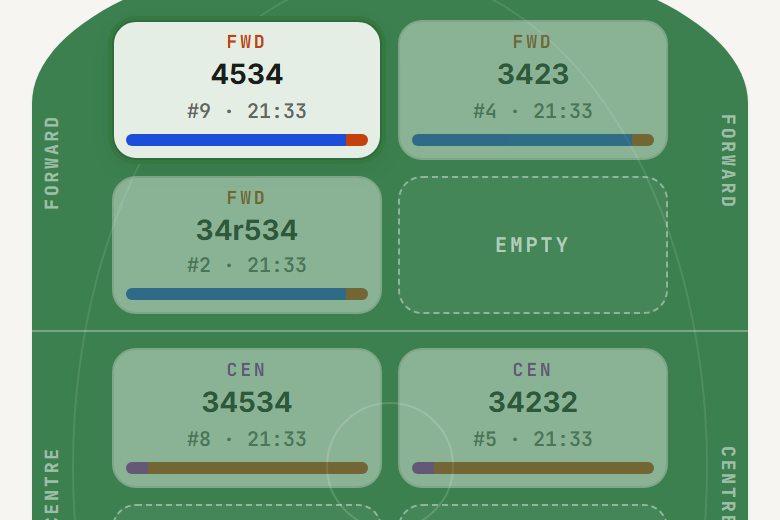
Long-press a player (or tap them, then Player actions) to open the sheet:
- Keep on field (AFL): the player is excluded from rotation suggestions and never leaves the playing area for the rest of the game.
- Keep in a zone (AFL): the player can rotate off temporarily but the algorithm always returns them to the same line. Netball's version is "Keep in position next break".
- League has no keep-on button in the live game. Give the player the Keep on role (Squad › Role) and the suggestions won't take them off. The FR and DH vest wearers also stay on for their period.
Season balance
The Stats tab's Season balance card shows how evenly time is spread across the whole squad: each player's minutes in each line or position this season, with a tint wherever a kid is owed at least a quarter (a half, for league from Under 10). The line at the top counts how many kids are within a quarter (or half) of even.
Aim for an even season, not an even single game. Individual games often sit uneven; that's normal and expected.
The Stats tab shows per-player breakdowns for the full season.